www.sarkarinaukrikar.com
www.sarkarinaukrikar.com
Post Date: 30-July-2026
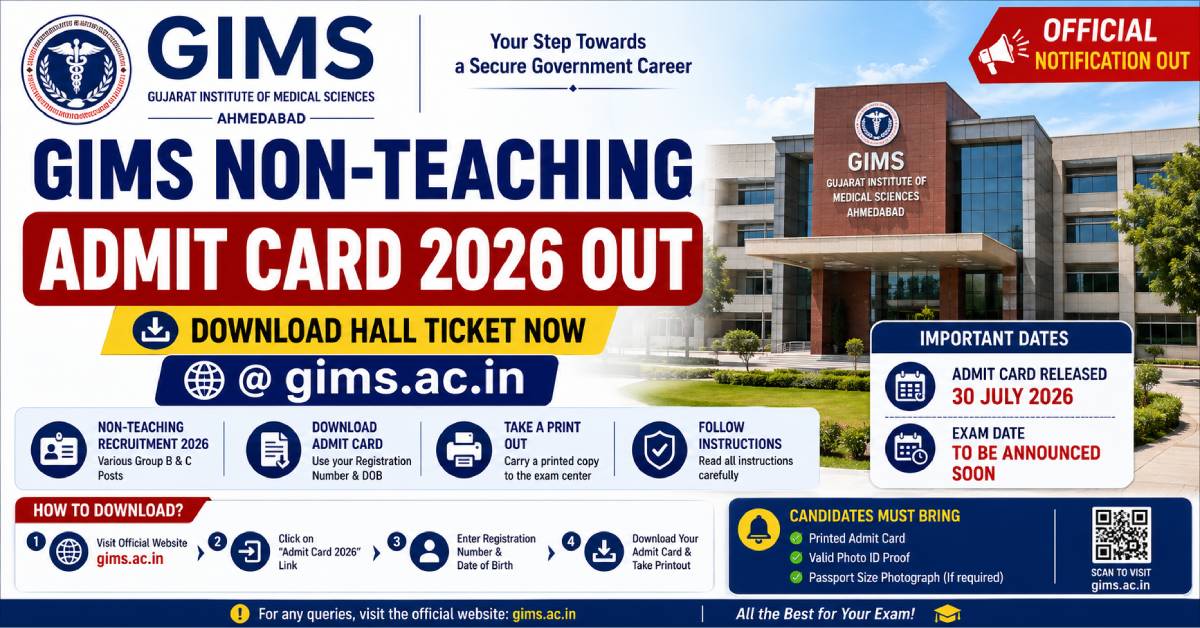
The GIMS Non-Teaching Admit Card 2026 is now available for download on the official website. Candidates must carry a printed copy of their admit card along with a valid photo identity proof to the examination centre. The hall ticket contains essential information such as the candidate's name, roll number, examination venue, reporting time, exam schedule, and important instructions. Applicants are advised to verify every detail mentioned on the admit card immediately after downloading it. If any discrepancy is noticed, they should contact the recruitment authorities before the examination date to avoid last-minute inconvenience.
Latest Update: The GIMS Non-Teaching Hall Ticket 2026 has been activated on the official recruitment portal. Candidates can log in using their application credentials to download and print the admit card.
GIMS Non-Teaching Admit Card 2026 Highlights
|
Particular |
Details |
|---|---|
|
Organization |
Government Institute of Medical Sciences (GIMS) |
|
Post Name |
Non-Teaching Posts |
|
Category |
Admit Card |
|
Status |
Released |
|
Mode of Release |
Online |
|
Official Website |
https://www.gims.ac.in |
|
Login Credentials |
Application Number and Registered Mobile Number / Password |
|
Exam Mode |
Computer Based / Written Examination (As per schedule) |
Why is the GIMS Admit Card Important?
The admit card is one of the most important documents required for entry into the examination centre. Candidates without a valid hall ticket may not be allowed to appear for the recruitment examination. Apart from serving as an entry pass, the admit card also helps candidates verify their examination schedule and centre details in advance. Downloading the hall ticket early allows sufficient time to resolve any technical or administrative issues before the examination.
Acts as the official permission to appear in the examination.
Contains the reporting time and examination venue.
Displays the candidate's registration details.
Includes examination-day guidelines issued by GIMS.
Required during document verification in later recruitment stages.
Important Dates
|
Event |
Date |
|---|---|
|
Application Process |
Completed |
|
Admit Card Release |
Released |
|
Examination Date |
As Mentioned on Admit Card |
|
Result Declaration |
To Be Announced |
Details Available on the GIMS Hall Ticket
Candidates should carefully review all the information printed on their admit card before appearing for the examination.
Candidate Name
Photograph
Roll Number
Registration Number
Post Applied For
Exam Date
Reporting Time
Exam Shift
Exam Centre Name
Exam Centre Address
Candidate Signature
Important Instructions
How to Download GIMS Non-Teaching Admit Card 2026?
Candidates who have successfully completed the application process can download their GIMS Non-Teaching Admit Card 2026 through the official recruitment portal. The hall ticket is available only in online mode. Follow the simple step-by-step process below to access and print your admit card.
Visit the official website of Government Institute of Medical Sciences (GIMS).
Open the Recruitment or Latest Notifications section.
Click on the link titled "GIMS Non-Teaching Admit Card 2026".
Enter your Application Number and the required login credentials.
Verify the entered details carefully and click on the Login/Submit button.
Your admit card will appear on the screen.
Download the PDF file and check all the details printed on it.
Take at least two clear printouts for future use.
Login Credentials Required
Candidates must keep their login information ready before downloading the admit card. Incorrect credentials may prevent access to the hall ticket.
|
Credential |
Purpose |
|---|---|
|
Application Number |
Candidate Identification |
|
Registered Mobile Number / Password |
Authentication |
|
Captcha Code |
Security Verification |
Documents to Carry Along with the Admit Card
Candidates must carry the following documents to the examination centre for identity verification. Entry may be denied if the required documents are not produced.
Printed copy of the GIMS Non-Teaching Admit Card 2026.
Original Aadhaar Card.
PAN Card.
Passport.
Driving Licence.
Voter ID Card.
Government-issued Photo Identity Card.
Recent passport-size photographs (if instructed).
Items Not Allowed Inside the Examination Centre
Candidates should avoid carrying prohibited items to the examination venue. Violation of examination rules may lead to cancellation of candidature.
Mobile phones.
Smart watches.
Bluetooth devices.
Electronic gadgets.
Scientific calculators (unless permitted).
Books and study materials.
Written notes or loose papers.
USB drives and electronic storage devices.
Bags and luggage.
Any unfair means or communication devices.
Examination Day Guidelines
Reach the examination centre at least 60 minutes before the reporting time.
Carry a printed admit card along with a valid photo identity proof.
Read all instructions printed on the hall ticket carefully.
Follow the seating arrangement allotted by the examination authorities.
Maintain discipline throughout the examination.
Do not leave the examination hall without permission.
Avoid carrying prohibited electronic devices.
Follow all instructions issued by invigilators.
Details to Verify After Downloading the Admit Card
Immediately after downloading the hall ticket, candidates should carefully check all the printed information. In case of any discrepancy, contact the recruitment authority before the examination date.
|
Information |
Verify |
|---|---|
|
Candidate Name |
Correct Spelling |
|
Father's Name |
Correct Details |
|
Photograph |
Clearly Visible |
|
Signature |
Available |
|
Registration Number |
Matches Application |
|
Roll Number |
Printed Correctly |
|
Exam Date |
Correct Schedule |
|
Exam Time |
Correct Shift |
|
Exam Centre |
Correct Address |
Selection Process
The recruitment process for GIMS Non-Teaching posts may consist of one or more stages depending on the post applied for. Candidates should qualify at every stage to move forward in the recruitment process.
Written Examination / Computer Based Test (CBT).
Skill Test (where applicable).
Document Verification.
Medical Examination (if applicable).
Final Merit List.
Important Instructions for Candidates
Read all instructions carefully before appearing for the examination. Failure to follow the examination rules may result in disqualification.
Download the admit card only from the official GIMS website.
Do not make any changes to the printed hall ticket.
Carry original identity proof along with the admit card.
Preserve the admit card safely until the recruitment process is completed.
Follow all examination centre instructions strictly.
Keep checking the official website regularly for further updates.
Quick Summary
|
Particular |
Status |
|---|---|
|
Admit Card |
Available Online |
|
Official Website |
www.gims.ac.in |
|
Mode of Download |
Online |
|
Printout Required |
Yes |
|
Photo ID Required |
Yes |
|
Exam Date |
Mentioned on Admit Card |
Frequently Asked Questions
1. Has the GIMS Non-Teaching Admit Card 2026 been released?
Yes. The GIMS Non-Teaching Admit Card 2026 has been released online. Eligible candidates can download their hall ticket through the official recruitment portal.
2. Where can I download the GIMS Admit Card 2026?
The admit card can be downloaded from the official GIMS website at www.gims.ac.in.
3. What login credentials are required?
Candidates generally need their Application Number and the required login credentials such as Password or Registered Mobile Number.
4. Is it mandatory to carry a printed admit card?
Yes. Candidates should carry a printed copy of the admit card along with a valid photo identity proof to the examination centre.
5. What should I do if there is an error on my admit card?
Contact the GIMS recruitment authority immediately and request correction before the examination date.