

|
Particulars |
Details |
|---|---|
|
Conducting Body |
Assam Public Service Commission (APSC) |
|
Post |
Forest Ranger |
|
Recruiting Service |
Assam Forest Service |
|
Parent Department |
Environment & Forests Department, Govt. of Assam |
|
Advertisement Number |
22/2025 |
|
Approximate Vacancies |
50 posts |
|
Hall Ticket Release |
24 August 2026 |
|
Written Exam Window |
30 August – 13 September 2026 |
|
Paper Format |
Conventional + Objective (OMR-based) |
|
Official Portal |
When Will the Hall Ticket Actually Go Live?
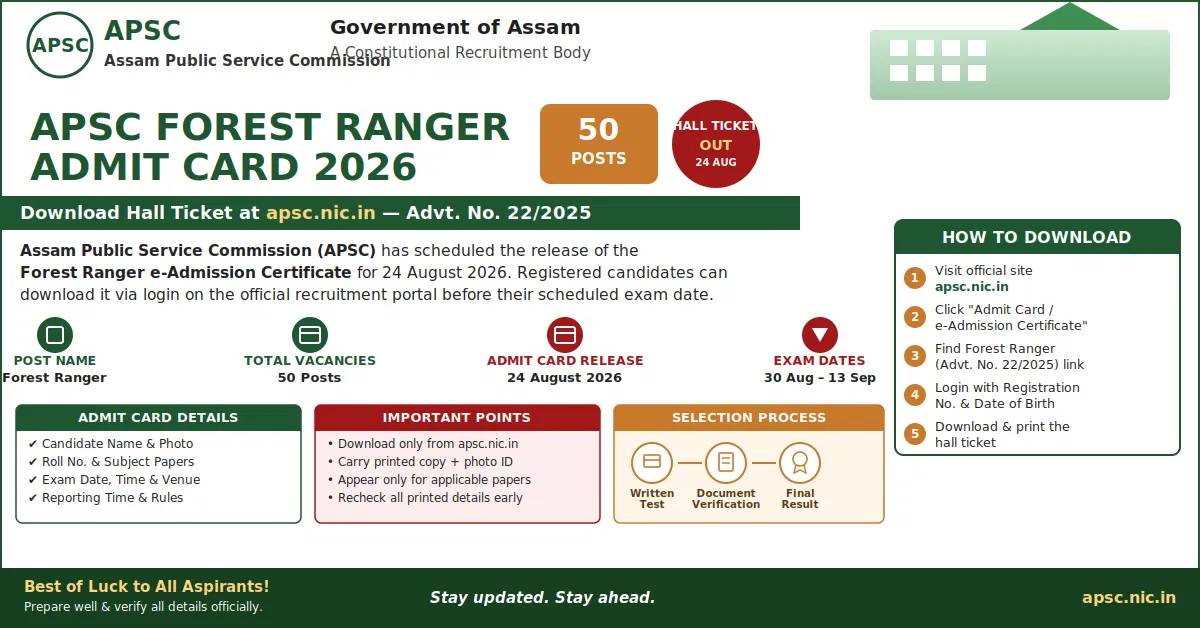
APSC has penciled in 24 August 2026 as the day the Forest Ranger call letter appears on its recruitment dashboard. Government portals occasionally push activation by a few hours, so candidates should keep refreshing the "Latest Updates" or "Admit Card" tab on the homepage rather than assuming the link is broken. As soon as it's active, download it immediately — waiting until the last day before your exam slot is risky if the server gets overloaded closer to the exam window.
? Tip: Bookmark the APSC homepage now and set a reminder for 24 August so you're not scrambling to find the right link later.
Related reading: ONGC Graduate Trainee Admit Card 2026
Full APSC Forest Ranger Exam Schedule 2026
Unlike a single-day test, the Forest Ranger written exam is spread over multiple dates because it covers a wide mix of optional subjects — from Agriculture and Botany to Civil Engineering and Forestry. Candidates only appear for the papers relevant to their chosen subject combination, as printed on their own admit card.
|
Date |
Session Timing |
Subject(s) |
Format |
|---|---|---|---|
|
30 Aug 2026 |
9:00 AM – 12:00 Noon |
English |
Conventional |
|
30 Aug 2026 |
1:30 PM – 3:30 PM |
General Knowledge |
Objective |
|
2 Sep 2026 |
9:00 AM – 11:00 AM |
Agriculture, Agri. Engineering, Veterinary Science, Computer Engineering |
Objective |
|
2 Sep 2026 |
1:30 PM – 3:30 PM |
Mathematics, Statistics |
Objective |
|
3 Sep 2026 |
9:00 AM – 11:00 AM |
Botany |
Objective |
|
3 Sep 2026 |
1:30 PM – 3:30 PM |
Zoology |
Objective |
|
6 Sep 2026 |
9:00 AM – 11:00 AM |
Civil Engineering |
Objective |
|
6 Sep 2026 |
1:30 PM – 3:30 PM |
Mechanical & Chemical Engineering |
Objective |
|
8 Sep 2026 |
9:00 AM – 11:00 AM |
Chemistry, Horticulture |
Objective |
|
8 Sep 2026 |
1:30 PM – 3:30 PM |
Physics |
Objective |
|
9 Sep 2026 |
9:00 AM – 11:00 AM |
Computer Application / Computer Science |
Objective |
|
9 Sep 2026 |
1:30 PM – 3:30 PM |
Geology |
Objective |
|
12 Sep 2026 |
9:00 AM – 11:00 AM |
Electrical Engineering |
Objective |
|
12 Sep 2026 |
1:30 PM – 3:30 PM |
Electronics Engineering |
Objective |
|
13 Sep 2026 |
9:00 AM – 11:00 AM |
Environmental Science |
Objective |
|
13 Sep 2026 |
1:30 PM – 3:30 PM |
Forestry |
Objective |
How to Download Your APSC Forest Ranger Hall Ticket
Once the download link is activated on the official portal, here's the process to follow
-
Open apsc.nic.in in your browser.
-
On the homepage, locate the 'Admit Card' or 'e-Admission Certificate' tab.
-
Locate the entry for Forest Ranger recruitment under Advertisement No. 22/2025.
-
Click the download link specific to the Forest Ranger written exam.
-
Sign in using your registration number and date of birth (or whatever credentials the portal requests).
-
Submit the form to pull up your e-Admission Certificate on screen.
-
Save the file to your device and download it in full.
-
Print a clean, legible copy — a smudged printout could cause issues at the exam gate.
Login Credentials You'll Need
Most APSC admit card portals ask for two identifiers: your registration/roll number generated during the application stage, and your date of birth. Type both exactly as they were entered on your original application form — even a small mismatch, like a wrong date format, can throw a login error. If the portal lists a different set of fields once it's active, follow whatever it displays at that time instead.
What Your Admit Card Will Show
Give the printed hall ticket a careful once-over before exam day. It should carry:
-
Your name, photograph and other candidate identifiers
-
Roll number and applicable subject/paper combination
-
Exact date(s) and reporting time for each session you're eligible for
-
Allotted exam centre/venue address
-
General instructions to be followed inside the exam hall
Spot an error — a misspelled name, wrong photo, or incorrect centre? Reach out to APSC through its listed official contact channel well before the exam date rather than waiting to sort it out at the gate.
What to Carry on Exam Day
-
A crisp printout of the e-Admission Certificate (avoid photocopies of photocopies)
-
One valid original photo ID (Aadhaar, PAN, voter ID, driving licence or similar)
Keep an eye on the official notice board or website for any last-minute addition to this list — commissions sometimes update requirements closer to the exam date.
Exam Day Checklist
-
Download the hall ticket the moment the link is activated — don't wait till the eleventh hour.
-
Cross-check your name, roll number, subject, date, time and venue on the printout.
-
Carry a clear, full-size printed copy plus your photo ID.
-
Report only for the specific paper(s) that apply to your subject combination.
-
Reach the centre well ahead of the reporting time listed on your card.
-
Read and follow every instruction printed on the admit card itself.
-
Keep checking apsc.nic.in for any revision to the exam programme right up to your test date.
Frequently Asked Questions
1.When will the APSC Forest Ranger Admit Card 2026 be released?
Ans: It's scheduled to go live on 24 August 2026 on the official APSC website.
2.Has the admit card actually been released yet?
Ans: The activation is planned for 24 August 2026. Always verify live status directly on apsc.nic.in rather than assuming it's already up.
3.Where can I download the hall ticket from?
Ans: Exclusively from the official APSC portal at apsc.nic.in, once the download link is switched on.
4.What are the exam dates for APSC Forest Ranger 2026?
Ans: Papers run across several dates between 30 August and 13 September 2026, depending on your optional subjects.
5.What credentials do I need to log in and download it?
Ans: Typically your registration number and date of birth — confirm the exact fields once the download page is active.